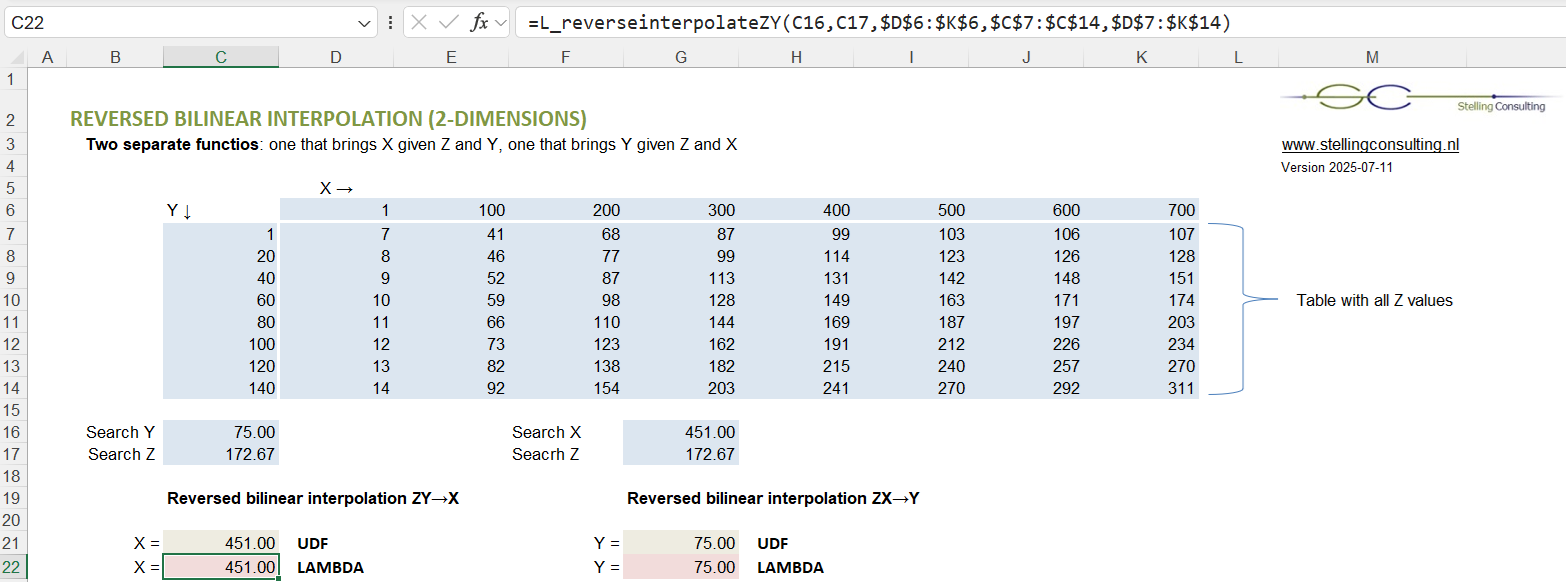
Reverse interpolation within a 2-dimensional table is much easier done by using a user defined VBA function or LAMBDA equivalent (defined directly within Excel's Name Manager) than by using regular Excel formulas. LAMBDA functionality exists since Office365/Excel 2021, and executes faster than VBA.
Reverse bilinear interpolation is the reverse of Bilinear interpolation (separate page). Two options:
Given Z-value (a value within a 2-dimensional data table), given Y-value (axis), it brings the X-value (axis).
Given Z-value (a value within a 2-dimensional data table), given X-value (axis), it brings the Y-value (axis).
Of course, it only works if given Z-value can indeed be "found" at a certain X and Y within the table.
Demo file contains reverse bilineair interpolation functions reverseinterpolateZY and reverseinterpolateZX (VBA) and their LAMBDA equivalentsL_reverseinterpolateZY and L_reverseinterpolateZX.
Also reverse linear interpolation within 1-dimensional table is possible with the helper functions, as can be seen at the bottom of the demo file.
Calculation explanation of above example - Reverse bilinear interpolation
STEP 1. Search Y = 75 lies between Y = 60 and Y = 80. Y-fraction = (75 - 60)/(80 - 60) = 0.75
STEP 2. Interpolated Z-values at Y = 75 (given Z-values at Y = 60 and Y = 80) become:
STEP 3. Search Z = 172.67 lies between Z = 164.00 and Z = 181.00. Z-fraction = (172.67 - 164)/(181 - 164) = 0.51
STEP 4. Interpolated X-value at Z = 172.67 (given X-values at Z = 164 and Z = 181) becomes: 400 + 0.51 × (500 - 400) = 451.00 (final result)
75 Z →
164.00
181.00
172.67
Y ↑ X →
400
500
451.00
Z-values are now "treated like" a transposed y-axis... ...and if X would have had multiple rows, then the function would bring interpolated values for all X rows.
Without further explanation: STEPS 3+4 (vertically) are 'similar' to STEPS 1+2 (horizontally). Having a flexible function able to do STEPS 1+2 (horizontally or vertically) is enough for reverse interpolation. In fact, with such function you can also do regular bilinear interpolation, as can be seen at the bottom of the Excel demo file.
VBA UDF code to be put in a module (alternative code found further below)
In MS Excel, press Alt+F11 to open the Visual Basic Editor (Windows). Via top menu: Insert → Module. Copy the code below into the module. The versatile helper function interpolatevalues can be used for linear interpolation, bilinear interpolation, reverse linear interpolation, and reverse bilinear interpolation.
LAMBDA functions to be copied in via Name Manager
Dependent on your Excel setting you need to use semicolon or colon in formulas. Choose your setting.
Alternative VBA UDF code
This alternative code is not multi-purpose, but more "straightforward", and works without helper functions. This code is not found in demo file (as you cannot have two functions with the same name), but you can simply replace all code.